83% of buyers’ agents say staging helps buyers visualize a property as their future home. Plus, 49% of seller agents report that virtually staged homes sell faster, showing how much presentation can influence a buyer’s first impression.
However, great photos alone aren’t enough to sell your home. Even the best virtually staged images can’t attract buyers if your listing doesn’t reach a large audience. That’s why strong presentation and maximum exposure go hand in hand.
Listing your home on the MLS through a Flat Fee MLS service gives your property the visibility it needs. When paired with virtually staged photos, it can attract more buyers, generate more showings, and improve your chances of receiving competitive offers.
What Is Virtual Staging?
Virtual staging means adding digital furniture, décor, and accessories to your home photos. Instead of moving real furniture into every room, designers create realistic images that make empty spaces look warm and inviting.
However, the purpose goes beyond making a room look nice. Staged photos help buyers understand how large a room is, where furniture fits, and how they can use the space. That makes it easier for them to picture themselves living there.
Unlike traditional staging, virtual staging only changes your listing photos. Buyers will still see the home in its actual condition during a showing. So, the edits should always represent the property’s true layout and features.
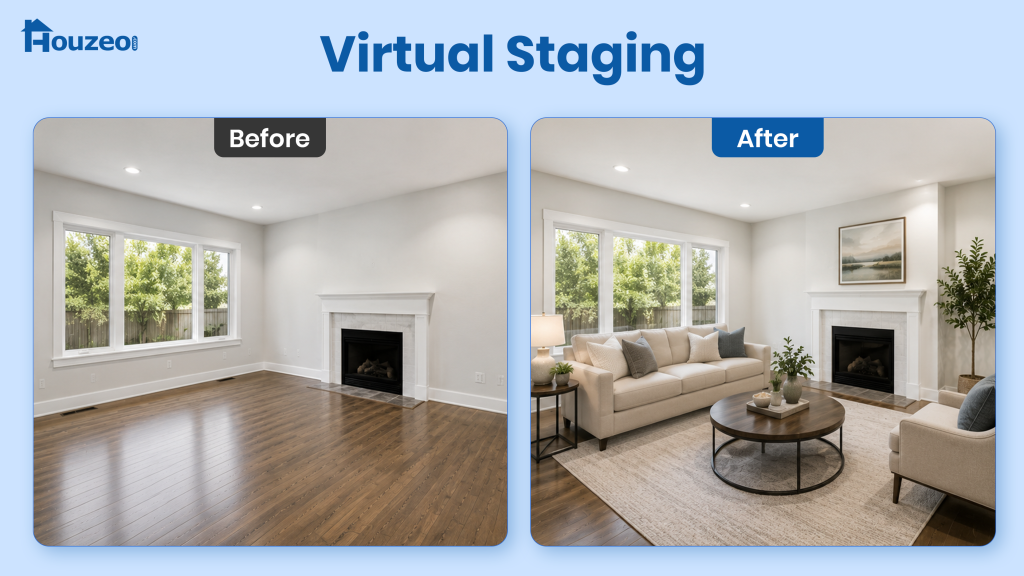
Virtual staging and AI staging may seem like two different services but they both add furniture and decor to listing photos. However, AI staging is actually a type of virtual staging. The key difference is how the staged images are created: traditional virtual staging uses designers, while AI staging uses artificial intelligence.
Why Is Virtual Staging Popular Among Home Sellers?
Photos often determine whether a buyer clicks on a listing or keeps scrolling. In fact, 81% of buyers rate listing photos as the most useful feature during their online home search. That’s why high-quality visuals are essential.
Empty rooms can look smaller, lack purpose, and make it difficult for buyers to judge the space’s layout and scale. Virtual staging adds realistic furniture and décor. This helps buyers better understand the home’s potential and makes listings more compelling.
How Much Does Virtual Staging Cost?
Most virtual home staging companies charge $15 to $50 per photo, although the final price depends on the room, turnaround time, and revision requests. Some providers also offer discounted packages if you stage multiple images.
AI staging tools cost much less, with many platforms charging $2 to $10 per image or offering monthly subscriptions. They work well if you need quick edits or manage multiple listings.
Although virtual staging requires an upfront investment, it usually costs far less than traditional staging. You can stage only the rooms that need it. Plus, you avoid the furniture rental, delivery, setup, and removal costs associated with traditional staging.
Virtual Staging vs. Traditional Staging
| Factor | Virtual Staging | Traditional Staging |
|---|---|---|
| Cost | Usually costs $15–$50 per image. AI staging tools may cost even less. You pay only for the photos you choose to stage. | Costs include furniture rental, delivery, setup, removal, and ongoing rental fees if the home stays on the market longer. |
| Time & Effort | Usually takes 1–2 days. Photos are digitally edited, so there is no furniture delivery or setup. | Requires more planning and coordination, including scheduling furniture delivery, setup, and removal. |
| Buyer Experience | Helps attract buyers online with more appealing listing photos and gives them an idea of each room’s potential. | Creates an in-person experience during showings, allowing buyers to see the furniture, layout, and room proportions firsthand. |
| Best For | Sellers who want to improve listing photos quickly and affordably. | Sellers who want to create a furnished experience for in-person buyers. |
Which Option Is Better?
If you’re selling a vacant home or working with a limited budget, virtual staging offers the best value. It improves your listing photos without adding thousands of dollars to your selling costs.
However, traditional staging is still worth considering for luxury homes, where buyers often expect furnished showings. In this case, a combination of virtual and traditional staging works the best.
Pros and Cons of Virtual Staging
Virtual staging can make listing photos more appealing and help buyers understand a home’s potential. However, it also has limitations, especially when buyers visit the property in person. Here are the key pros and cons to consider:
Pros
- Flexible Design: You can present the same room in multiple ways, such as a home office, nursery, or guest room. This helps different buyers picture themselves living in the home.
- Professional Presentation: Virtual staging uses matching furniture, décor, and color schemes across every room. As a result, your listing looks more polished and leaves a stronger first impression.
- Clear Room Purpose: Empty rooms can leave buyers guessing how they’ll use the space. Virtual staging gives each room a clear function, making the layout easier to understand.
- Easy to Update: If your listing isn’t attracting enough buyers, you can refresh the photos with a new design style for a minimal cost instead of paying for another photoshoot.
Cons
- Different In-Person Experience: Buyers will see an empty home during showings, not the furnished version from your listing photos. This can make some rooms feel smaller or less inviting than they expected.
- Depends on Photo Quality: Virtual staging works with your existing photos rather than replacing them. If the original images are dark, blurry, or poorly framed, the final edits won’t look polished either.
- Requires Honest Editing: Virtual staging should only add furniture and décor, not hide damage or structural issues. Misleading edits can reduce buyer trust and may even violate your MLS’s photo guidelines.
- Not Ideal for Every Home: Virtual staging may have less impact on homes that already have attractive furniture or properties where buyers need to see the home’s actual finishes and features.
Types of Homes Best Suited for Virtual Staging
While virtual staging can work for almost any listing, it delivers the biggest impact for homes where furniture can better showcase the space. Here are the properties that benefit the most from virtual staging:
- Vacant Homes
- New Construction Homes
- Investment Properties
- Fix-and-Flip Homes
- Homes with Unused or Flexible Spaces
- Luxury Homes
- Rental Properties
- Model Homes
How to Virtually Stage a Home?
When you sell your house, the quality of your property photos can make or mar the experience. Follow these 6 tips for successful digital staging:
- Declutter and Depersonalize: Remove personal belongings, excess furniture, and clutter to give the staging software or designer a clean space to work with.
- Capture High-Quality Photos: Use bright, high-resolution photos taken from multiple angles. Better photos create more realistic staging results and showcase your home’s best features. You can also hire a real estate photographer near you for this.
- Choose a Virtual Staging Tool: Compare AI apps, DIY software, and professional virtual home staging services based on your budget, turnaround time, and customization needs.
- Select a Design Style: Pick furniture and décor that match your home’s architecture and appeal to your target buyers, whether it’s modern, farmhouse, or contemporary.
- Review the Final Images: Check that the furniture looks proportional, the lighting appears natural, and the edits accurately reflect the room’s layout before approving them.
- Upload the Staged Photos: List your home on the MLS and add the edited images to your listing and real estate websites. Use your strongest virtually staged photo as the cover image to attract more buyers.
3 Best Virtual Staging Apps
Virtual staging apps are primarily used for virtual interior designing. Most such apps offer augmented reality (AR) features that virtually improve the real world using computer-generated visuals.
1. Houzz
Houzz is an interior design simulator app that you can use for free (or purchase its paid add-ons). You can switch on your phone camera, access the app’s product library and place new interiors in the room. You can view rooms from a 3D perspective too!
2. MagicPlan
With the MagicPlan app, you can create a virtual blueprint of your home. Additionally, you can virtually paint the walls, add furniture to spaces, and get a 360° panoramic view of the room. Nevertheless, make sure that the measurements taken by the app are accurate.
3. Housecraft
The Housecraft app allows you to experiment with different furniture options. Interior decoration becomes simpler with this app. You can upload photos of your rooms and add furniture to them. The app is known for the accurate measurements it takes.
Comparison of Features
Here are the features of the 3 best virtual staging apps:
| Feature | Houzz | Magicplan | Housecraft |
|---|---|---|---|
| Room Photo Upload | ✅ | ✅ | ❌ |
| Furniture Placement | ✅ | ✅ | ✅ |
| Augmented Reality | ✅ | ✅ | ✅ |
| Virtual Blueprint | ✅ | ✅ | ❌ |
| Auto Room Measurements | ✅ | ✅ | ✅ |
| Virtual Renovation | ✅ | ✅ | ❌ |
| 3D View | ✅ | ✅ | ✅ |
| Virtual Tour | ✅ | ✅ | ❌ |
3 Best Virtual Staging Software/Websites
Here are three room staging simulator software and websites that you can use to upgrade your home:
1. Planner 5D
Planner 5D offers AI features to furnish your room in multiple ways. You only have to upload a picture of your semi/fully furnished room. You can use Planner 5D for free or purchase the paid add-ons for additional furniture options and extra features.
2. Homestyler 3D
Homestyler 3D is free software (with paid add-ons) that helps you recreate your floor plan and furnish rooms. You can download realistic photos and videos of the staged rooms. Moreover, buyers can have a 3D look at your staged property.
3. Roomstyler 3D
Roomstyler 3D helps you replicate your room design by adding doors, windows, and furniture. Furthermore, you can experiment with various wall paints and floorings. You can either use Roomstyler 3D for free or pay for an upgrade.
Comparison of Features
Here are the features of the 3 best virtual staging software programs:
| Feature | Planner 5D | Homestyler 3D | Roomstyler 3D |
|---|---|---|---|
| Photo Enhancement | ✅ | ✅ | ✅ |
| Furniture Placement | ✅ | ✅ | ✅ |
| Virtual Renovation | ✅ | ✅ | ✅ |
| Interactive Virtual Tours | ✅ | ✅ | ✅ |
| Conversion from Blueprint to 3D Model | ✅ | ✅ | ✅ |
3 Best Virtual Staging Companies
Some companies offer virtual staging services that are different from traditional home staging companies. Virtual staging costs can range between $20 and $100 per photo. This depends on the company and service you choose.
Here are 3 best home staging companies you could get in touch with:
1. BoxBrownie
BoxBrownie is a popular virtual real estate staging service company. You are supposed to choose a plan and upload the photos. The experts at BoxBrownie edit the staged photos of your home as per your request and send them back within 48 hours.
2. Styldod
Styldod offers digital staging services wherein you choose a plan and place an order. Once you upload the photos, you generally receive professionally edited photos within 48 hours.
3. PadStyler
PadStyler helps with virtual staging by redecorating your home. You can choose from hundreds of design choices to elevate the property’s appearance. If you order in bulk, you could avail discounts too.
Comparison of Features
Here are the features of the 3 best virtual staging companies:
| Feature | BoxBrownie | Styldod | PadStyler |
|---|---|---|---|
| Photo Enhancement | ✅ | ✅ | ✅ |
| Furniture Placement | ✅ | ✅ | ✅ |
| Virtual Renovation | ✅ | ✅ | ✅ |
| Decluttering and Virtual Cleaning | ✅ | ✅ | ✅ |
| Interactive Virtual Tours | ✅ | ✅ | ❌ |
Is Virtual Staging Legal?
Yes, virtual staging is legal. Most Multiple Listing Services allow virtual staging. 60% of the Realtors associated with the National Association of Realtors (NAR) agree that virtual staging impacts the buyers’ perspective.
Nevertheless, virtually staged photos may need to be watermarked, depending on your MLS. Check with your local MLS for its specific rules and disclosure requirements.
Do’s and Don’ts of Virtual Staging
| Do’s | Don’ts |
| Mention that the photo is virtually staged. | Add structures that don’t exist. |
| Ensure that the dimensions are accurate. | Hide the defects in your home. |
| Keep the interior design realistic. | Present an overly renovated photo of your house. |
| Use royalty-free objects to stage your home. | Use copyrighted items in your staging. |
| Consult your real estate agent before you list your home on the MLS. | Ignore the guidelines of the MLS your property will be listed on. |
Should You Opt for Virtual Home Staging?
Yes, if you want an affordable way to enhance your listing’s online presentation. Virtual staging helps buyers visualize the space, attracts more attention to the listing, and works particularly well for vacant homes. For luxury properties, it can complement traditional staging during private showings.
However, effective presentation must be supported by sufficient market exposure. Virtual staging improves the visual appeal of your listing, while an MLS listing through a Flat Fee MLS service can expand its reach among prospective buyers and real estate agents. Together, they can strengthen your property’s online presence and support a more competitive selling process.
» Houzeo Reviews: See why thousands of 11,000+ sellers have rated Houzeo 4.9 stars!